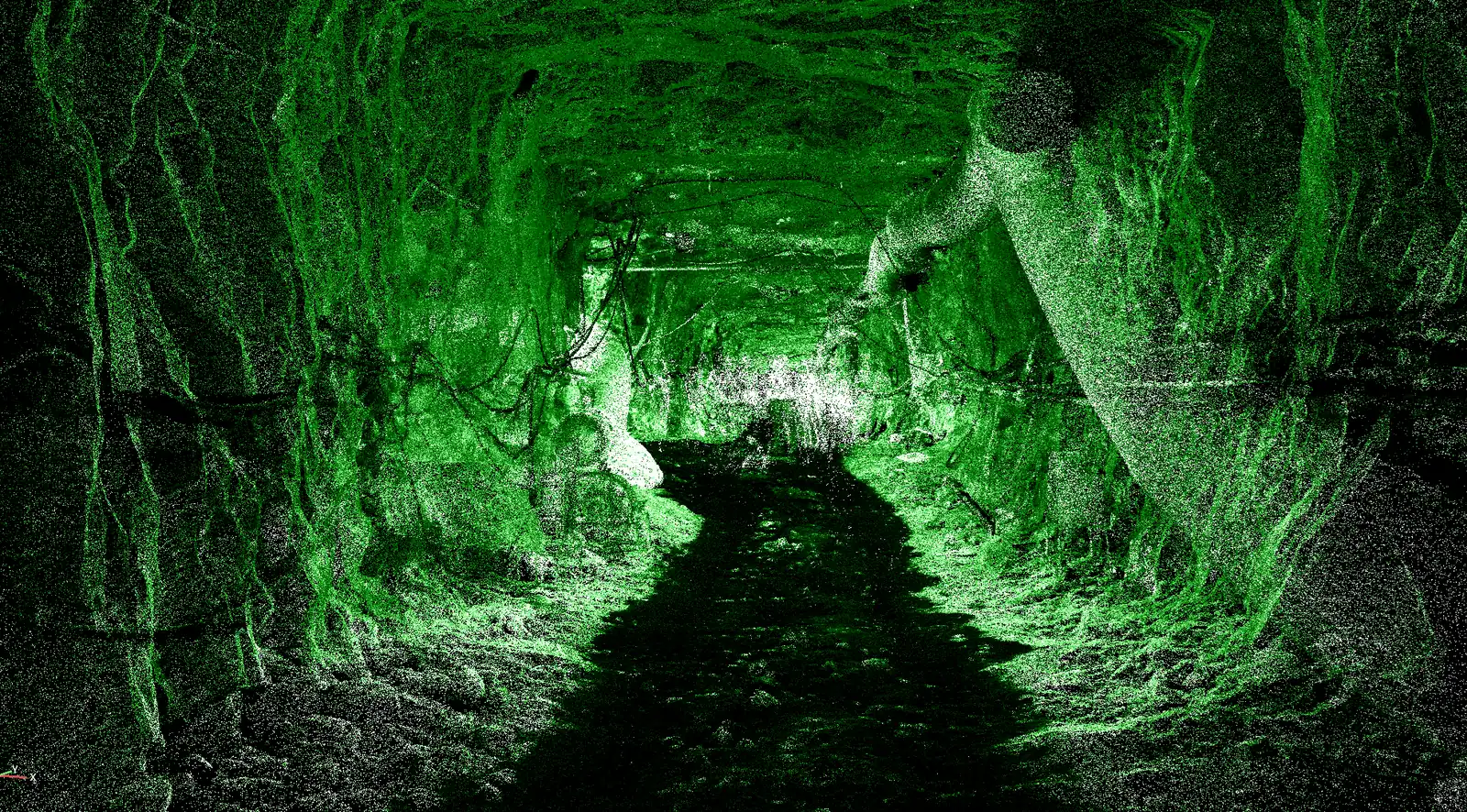
Tunnel bore point cloud coloured by intensity
Premium Add-On Module Runs on AutoTerra Pro Spatial or above

AutoTerra Tunnel

Mine drives and tunnels, from any scanner. AutoTerra Tunnel takes a bore — terrestrial, SLAM, handheld or mobile — and returns audited cross-sections, conformance numbers and inspection records. Drives, stages and stations live in the project file, so every heading keeps its own history, and nothing reaches a deliverable until a person has accepted it.

4
profile shapes — circle/TBM, horse-shoe, D, rectangle
2
tracers — engineered profile & blasted rock
0.25 m
densified ring interval
Any
scanner — terrestrial, SLAM, handheld, mobile
Every
station audited before it ships
The workflow

From raw scan to section sheet

Four stages, in one window. The baseline comes from CAD, a drawn path or a two-click oblique line, and stations at whatever interval the job needs. The tracer returns a ring at every station. Every ring is then judged by a person. Only then does anything become a deliverable.

Baseline Trace Audit Deliver
Baseline — centreline from CAD, a drawn path, or a two-click oblique, stationed at any interval
Trace — floor, roof and wall passes classify the bore; the tracer matched to its shape returns a ring at every station
Audit — accept or reject on the metrics, and correct anything by hand
Deliver — densify to fine rings, then station sheets, DWG / XLSX / PDF, GIS and CAD outlines, classified LAS
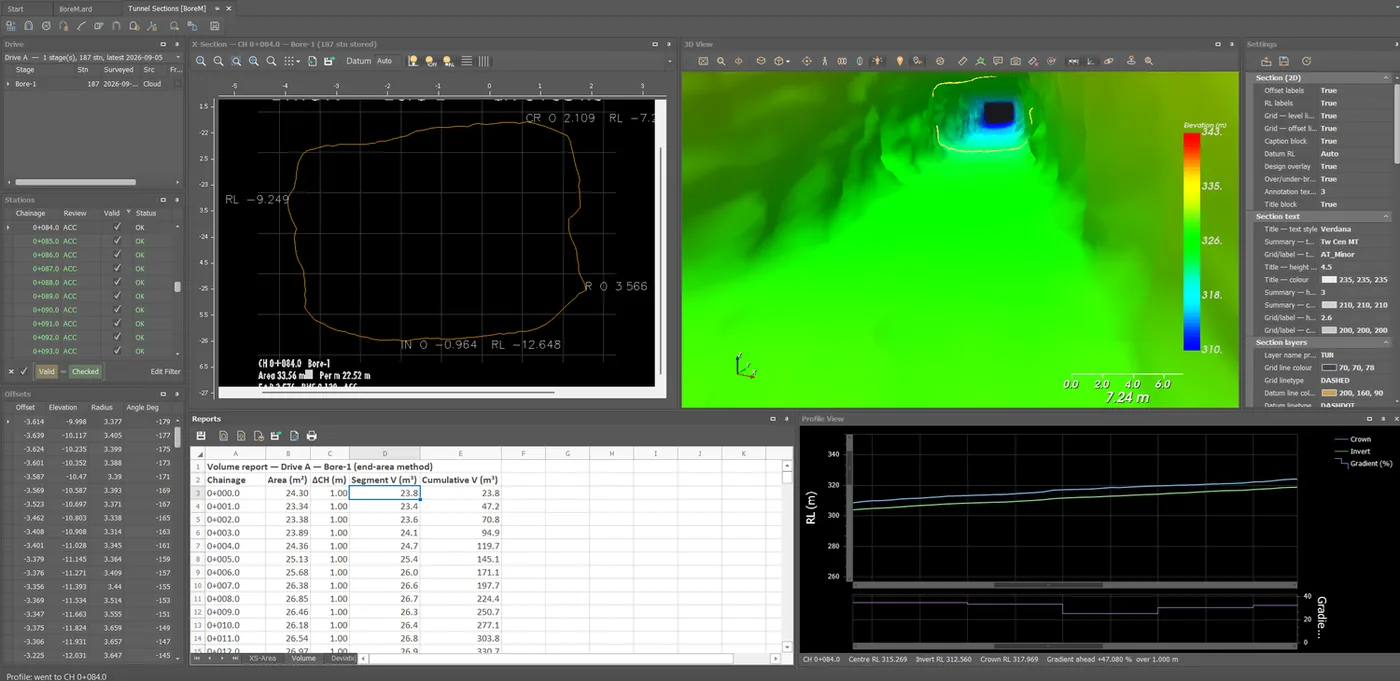
AutoTerra Tunnel workspace: drives, stations, cross-section, 3D bore, volume report and profile view
Extraction

Scans are never clean

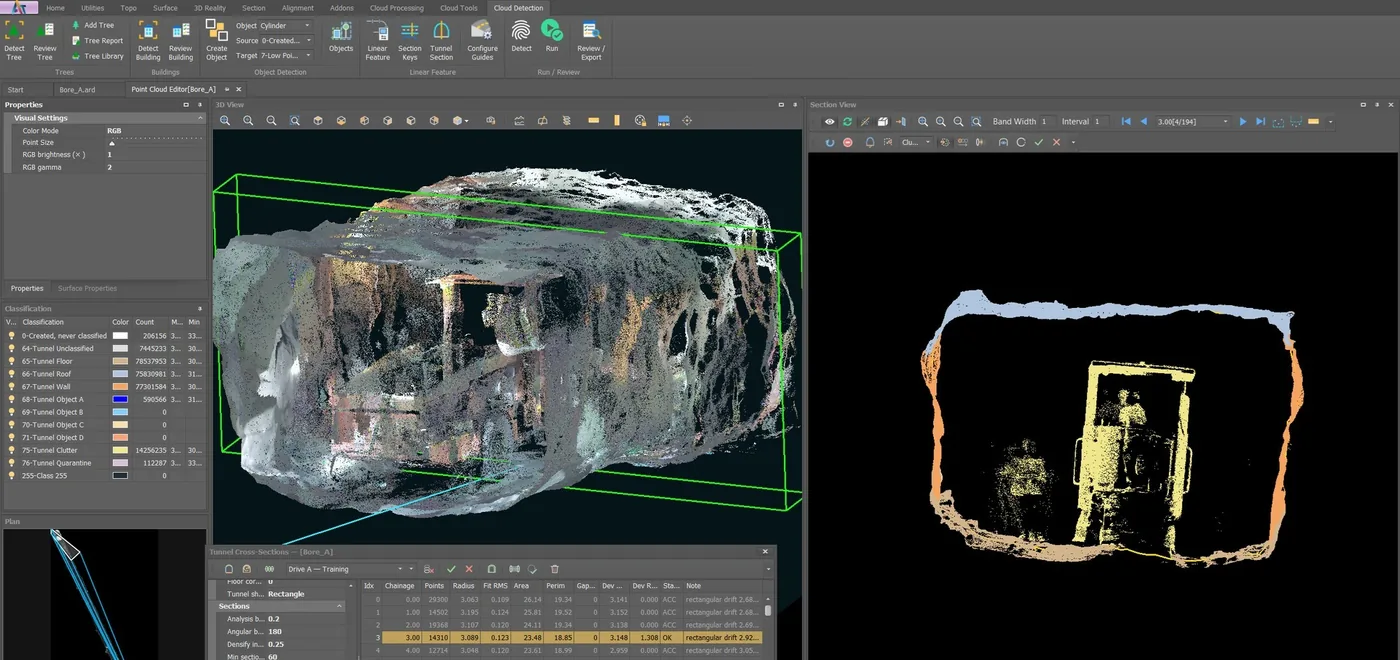
A working bore is full of things that are not the wall: machinery, vent lines, muck, cross-cuts, a face that moves between surveys. The tracer is built for that, and picks its method from the shape of the bore — radial sweep with shape fitting for engineered profiles, per-surface assembly for blasted rock.

Circle / TBM Horse-shoe Semi-circular D Rectangle Partial rings Clutter class
Shape library sets tolerances, tracer and deviation reference per bore type
Corner mode — a floor-to-wall fillet reads as geometry, not as error
Enclosure gating, side-opening bridging and junction-spur clamping, so an intersection does not tear the outline
Cross-station occlusion filtering and outlier refit
Partial rings at the face, with coverage and design-reached reported per station
Mine bore in processing with the tunnel class scheme: floor, roof, wall, objects and clutter
Review & manual authority

Nothing ships unaudited

A traced ring is a proposal, not a result. Every station arrives with the numbers to judge it and a verdict that has to be given — and where the tracer has read the rock wrongly, the operator's pen is the authority. The verdict travels into every report and export.

Grow pen Assign-to Close Retrace Accept / Reject
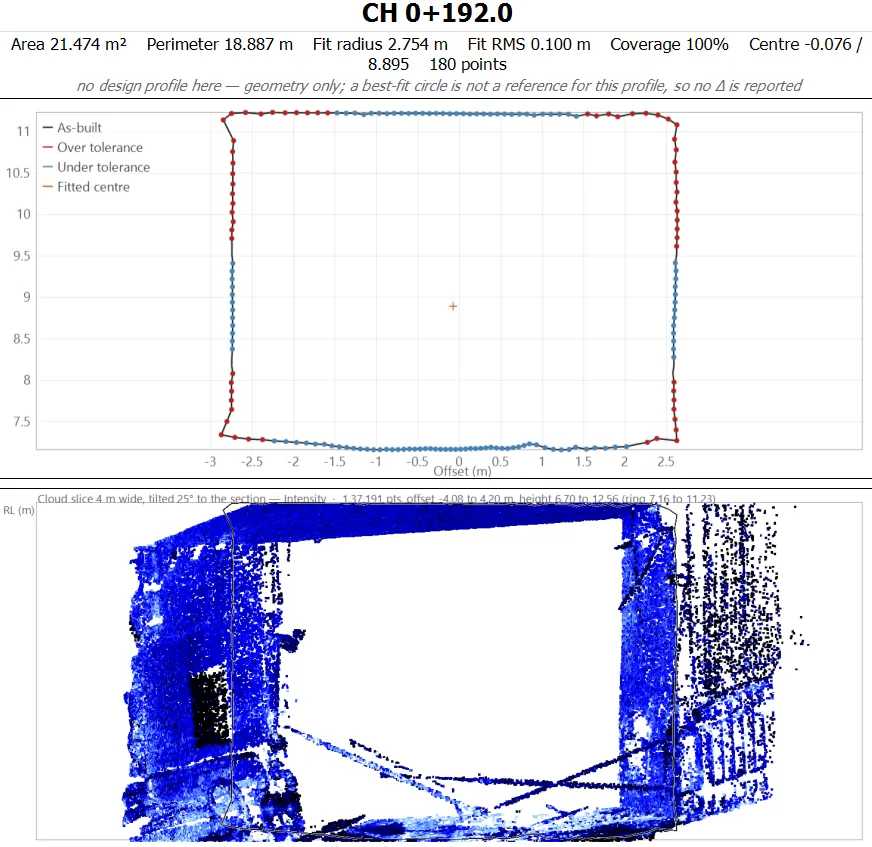
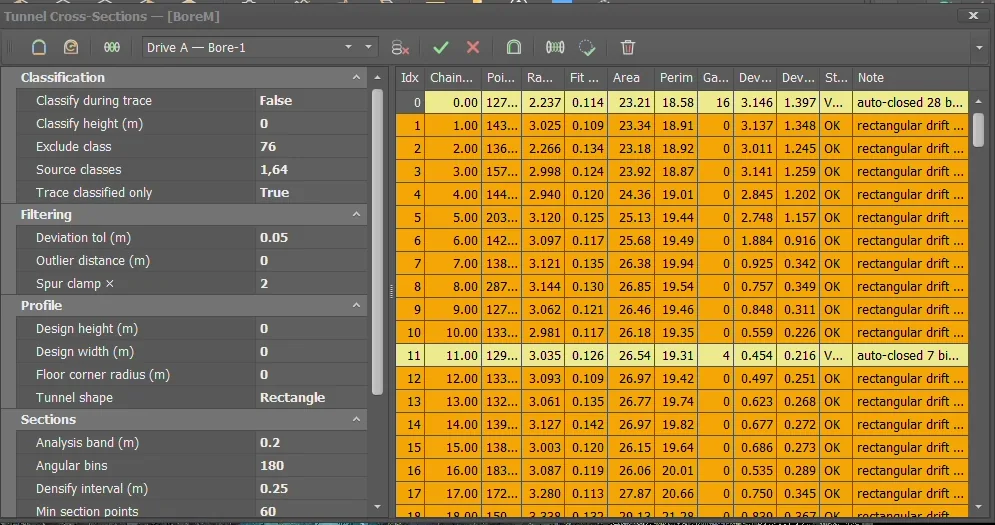
Points, fitted radius, fit RMS, area, perimeter and gap % on every station
Deviation min / max / RMS with an over-tolerance flag
Accept or Reject as an explicit verdict; auto-closed gaps flagged for a quick look
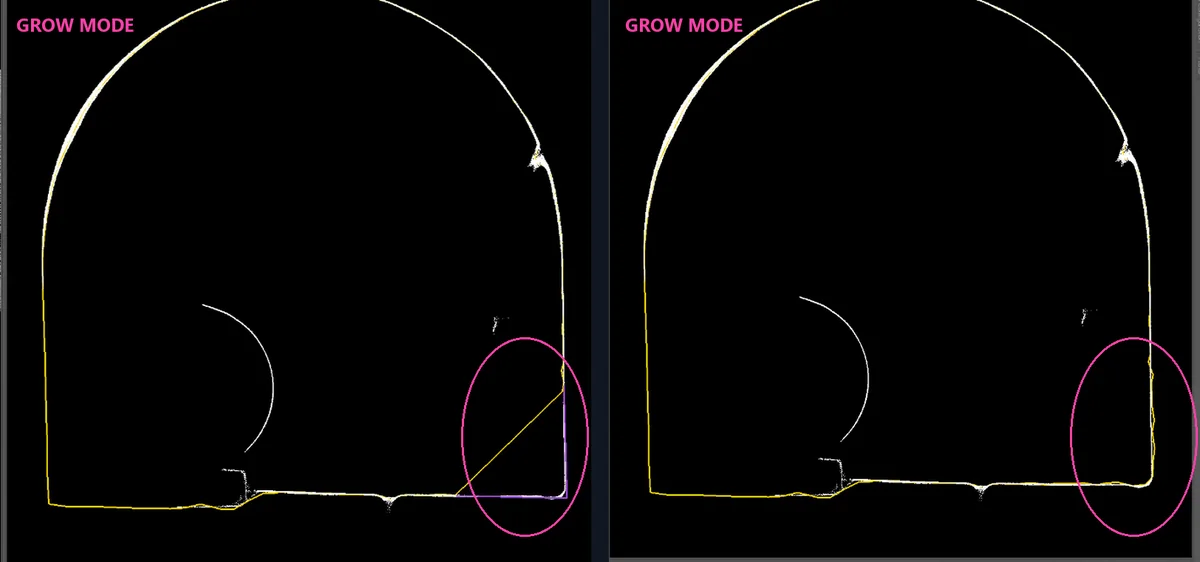
Grow pen — draw the real wall run and the outline follows it, refined outward-only within tolerance
A rejected station never ships as a row of zeros — every report states what it covers
Grow pen correcting a traced corner: before and after
Working at length

One ring, then the whole drive

Trace or author one good ring, then chain it along the bore: each station fits the previous ring to its own classified evidence, audited stations are left alone, and everything returns as pending for the normal audit. After the audit, densify to fine rings — every 0.25 m, say — for a smooth 3D bore and a convincing walk-through. Reporting always stays on the audited stations.

It was built around a working mine drive — rough blasted rock, machinery in the section, cross-cuts every few tens of metres, a face that moves between surveys, a scanner carried by hand. Civil bores came easily afterwards.

Propagate ring Densify Multi-drive store End-area volumes SLAM & handheld
Drives, not just bores — every heading keeps its own stages and history
A clutter class for machinery, vent lines and muck
End-area volumes by chainage — segment and cumulative, on their own report tab
Built against noisy hand-carried data, not adapted to it afterwards
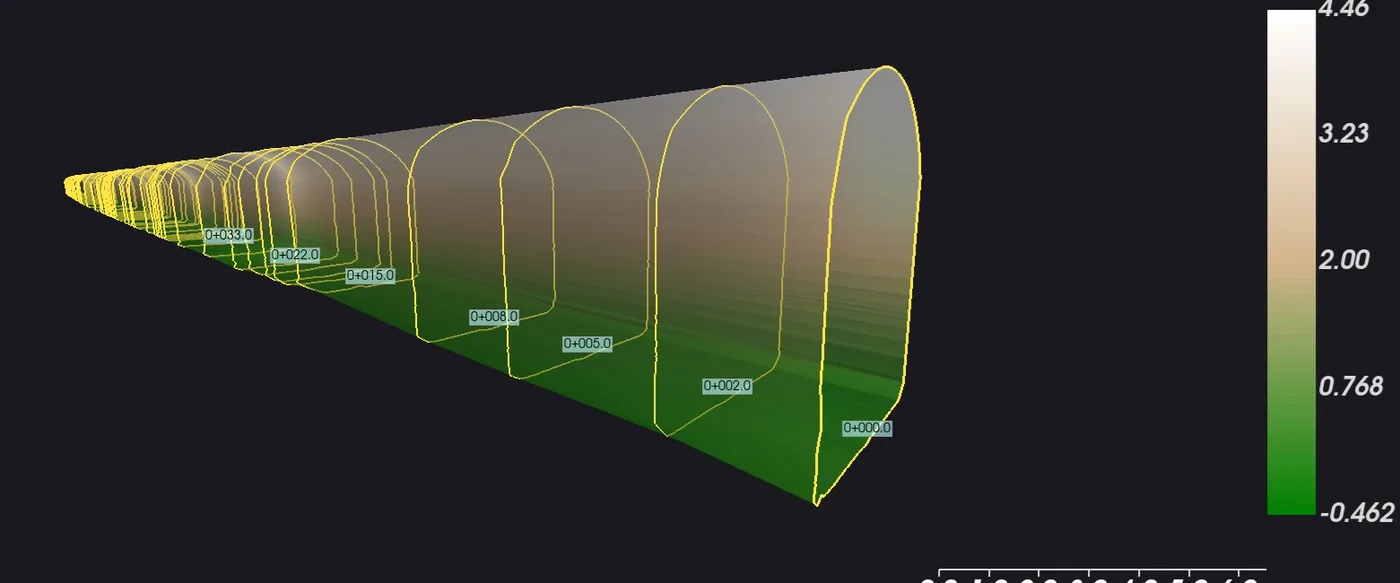
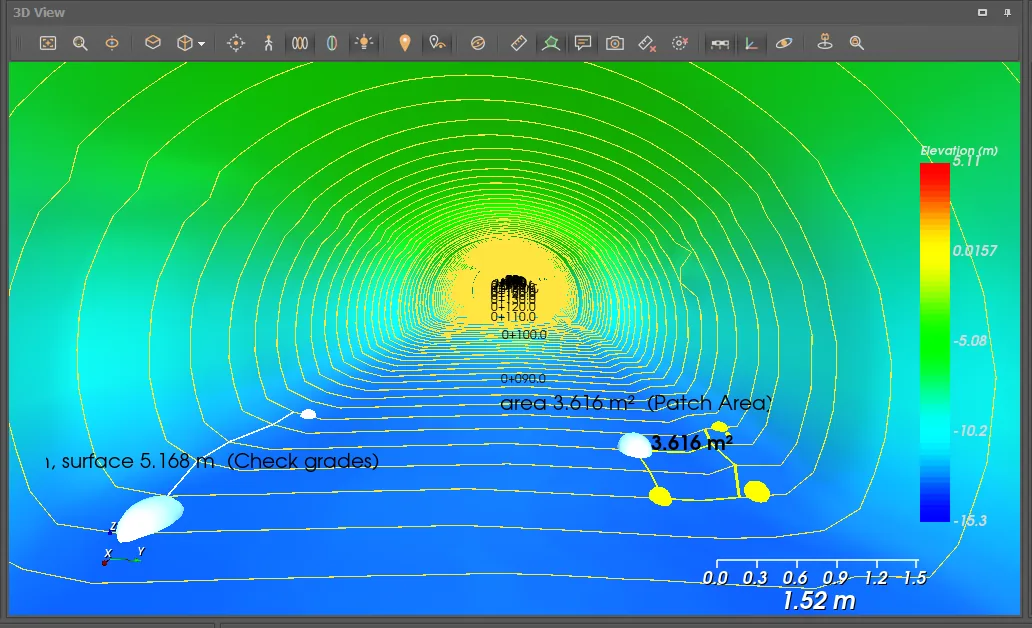
3D bore skin lofted from the audited rings, labelled by chainage
Deviation & conformance

Numbers that hold up

Wriggle draws per-vertex radial deviation onto the ring against the fitted circle. Load a design radius or profile and the same read becomes true over- and underbreak. Reports name their reference, so a wriggle plot is never mistaken for a compliance statement — and where no design covers a chainage, the report says so rather than inventing a delta.

Wriggle Over / underbreak Design overlay Compliance line 3D bore skin
DevMin / Max / RMS per station with over-tolerance flags
Design overlay — a tick at every vertex, red over and blue under
Compliance line — max over, max under, percentage within tolerance
Design width, height, radius, springline and design-reached progress
3D bore skin lofted from the audited rings, carrying the measured volume and surface area
Station section coloured over and under tolerance, with the cloud slice it came from
Section, 3D & inspection

Built to be looked at

A locked cross-section with station navigation, the profile view with crown and invert along the drive, and a 3D ring stack you can clip to a band and walk through. Findings are pinned onto the bore itself, in tunnel coordinates, and survive a re-trace.

Profile view 3D ring stack Isolate Walk mode Measure in the bore Inspection markers
Table-to-drawing link — pick a vertex row and it marks on the ring
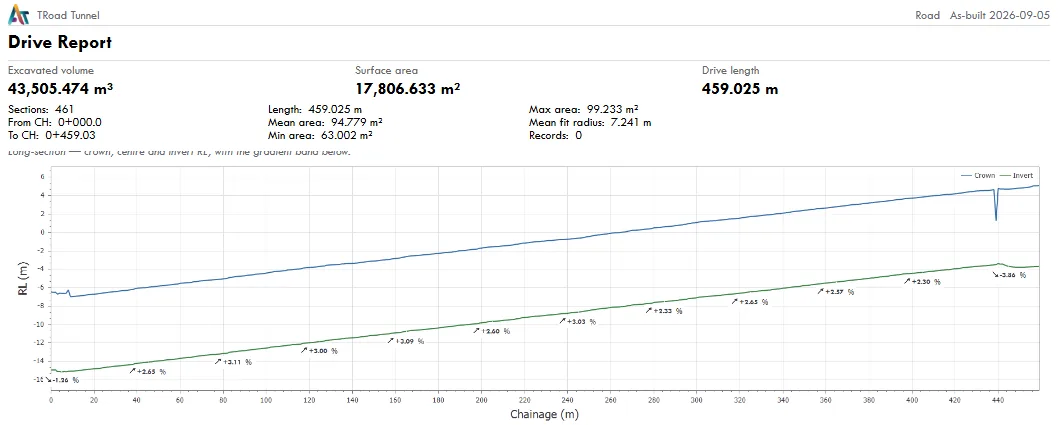
Profile view — crown and invert along the drive with a gradient band and a live RL read-out
First-person walk mode along the classified floor
Pin overbreak, water ingress, cracks, spall, rock bolts or obstructions — with kind, severity, note, author and timestamp
Markers carry chainage, offset, RL and angle round the ring, plus the measured deviation where a design covers that chainage
Open / Resolved state for re-inspection, held against the bore rather than the stage
Measurements and markers pinned in the 3D bore
Reports & export

What comes out

Every report states what it covers — "116 reported of 137 traced" — and names the reference its numbers were measured against. Valid stations only.

Drive Report XLSX DWG PDF GIS / CAD Classified LAS
Drive Report — excavated volume, surface area and drive length up front, then the plan, the isometric, the long-section with gradients, and a view along the bore every 20 m
Cross-section tab — section area at every station across the whole drive
Volume tab — area, ΔCH, segment and cumulative volume by chainage, end-area method
Deviation tab — DevMin / Max / RMS per station with over-tolerance flags and the stated reference
Station sheets — the drawn section with offset and RL labels, level grid, datum and a caption block carrying area, perimeter, fit and verdict
Marker appendix — findings in chainage order with open and resolved counts, omitted entirely when there are none
Geometry and cloud — traced outlines and the fitted bore axis as attributed LineStringZ, plus the classified LAS
Drive Report: excavated volume, surface area, drive length and long-section
Beyond the drive

One project, from scan to section sheet

The bore you section is the cloud you classified, in the project that already holds your survey, terrain, alignment and corridor work. Nothing is exported and re-imported, there is no second coordinate system to reconcile, and the results land in the drawings and reports your team already uses — one interface, one licence.

Drive / Bore → Stage → Stations, stored in the project file
Scanned stages and imported survey rings coexist and compare
Text and gauge import brings coded rings and station tables in as stages
CAD centrelines and design profiles come in alongside
One-click re-run; pruning always protects imported and surveyed data
Trace settings beside the station results grid
Licensing

A premium add-on, on a platform you already run

AutoTerra Tunnel is licensed above the base application, on an AutoTerra Pro Spatial or Pro Aero host, and is available with the AutoRoads line. It is included in the 30-day AutoTerra Pro Aero trial, so you can run it on your own section before committing to anything.

The module is in active field validation on real tunnel and mining datasets, and is offered at early-access pricing while that continues. Two-epoch convergence and deformation tracking, and the unrolled-wall deviation heat map, are on the near-term roadmap rather than in this release — early-access customers get the current toolset now, a direct line to shape what ships next, and a locked price before it moves to standard list.